Find events
All events shows every event as a list, a calendar or a map; search and filters narrow it down.
For people who go. Nothing needed first.
Partly in the app.Filters for public transport and online only are not in the app yet.

Step by step
Step 1: Open All events
The list shows what is next first, with the date, place and how many places are left.
Step 2: See it as a calendar
The calendar shows the month; a day opens what is on.
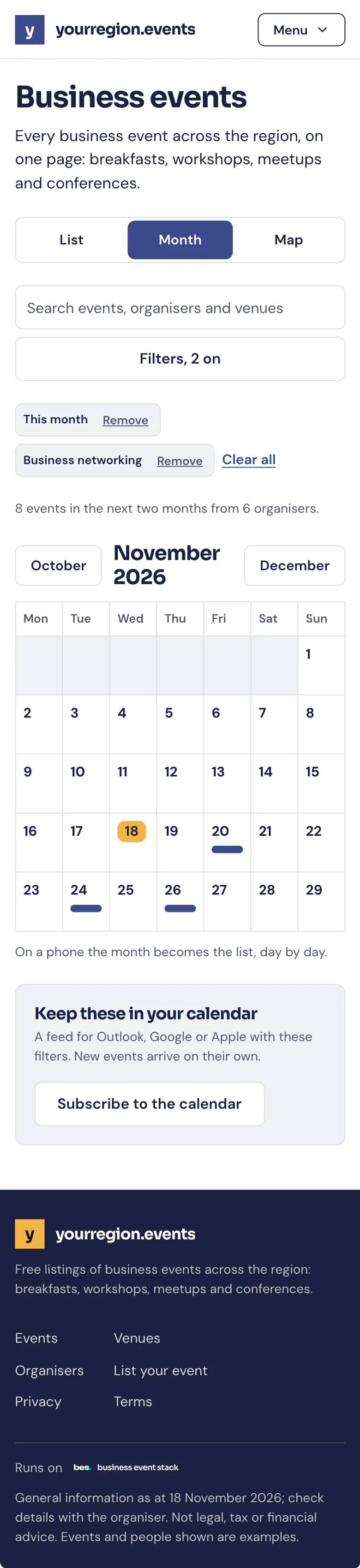
Step 3: Or on a map
The map shows where each event is. Move it to see what is near.

Step 4: Open an event
The event page has who it is for, the venue and how to get there, and Book.

Tips
Filters stay as you set them when you come back.
Search looks at titles, organisers and venues.
What’s next
- NextBook a free placeChoose Book on the event, give your name, and your QR pass arrives at once.Read the guide
- RelatedSee events near youOpen the map in All events and allow your location, or type a postcode.Read the guide
- RelatedEvents picked for youFor you picks events like the ones you have booked; it says why for each.Read the guide
More about this on Found where people look, one of our feature pages.
Was this helpful?
Reviewed 12 November 2026 and checked against the app that day. General information as at 12 November 2026, not legal, tax or financial advice. Screens show example data.